LetRelay vs Notion, Asana, LabTab and More for Research Labs
A plain comparison of LetRelay with Notion, Asana, Trello, ClickUp, monday.com, LabTab, Quartzy and Benchling for running a research group: what each does, what it costs for ten people, how reports work, and where LetRelay is the wrong choice.
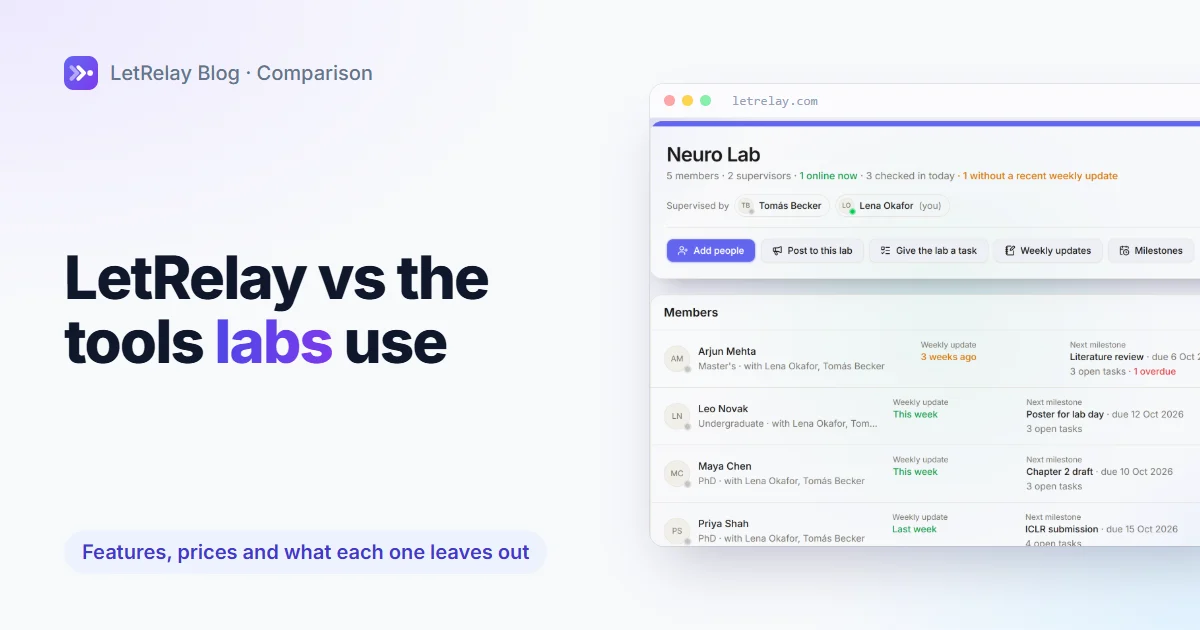
This lab management software comparison covers what a PI actually needs: knowing where each student stands, deadlines, equipment, grants and reports. Notion, Asana, Trello, ClickUp and monday.com are general task tools, so the lab structure is yours to build. LabTab is a platform for group leaders, Quartzy handles orders, and Benchling is a notebook. LetRelay builds the people side in and costs $20 a month for up to 15 people. It is not a lab notebook, and printable reports are on Pro.
We build LetRelay, so read this with that in mind. Every price and feature below comes from the vendor's own page, read on 5 November 2026, and where a page was silent we say "not listed" instead of guessing. The cases where LetRelay is the wrong choice have their own section.
The short version
| Tool | What it is built for | What it leaves to you | Cost for 10 people, per month |
|---|---|---|---|
| LetRelay | Running the people and operations of a research group or a team | A lab notebook, university single sign-on, a supplier catalogue | Free up to 5 people; Pro is $20 flat for up to 15 |
| Notion | Flexible pages and databases | Every lab-specific structure | Plus $10 per member, so $100 |
| Asana | Project and task management | The weekly update, milestones, equipment, grants | Starter $10.99 per user, so $109.90 |
| Trello | Kanban boards | Everything except the boards | Standard $5 per user, so $50 |
| ClickUp | Tasks, docs and dashboards | The lab structure; dashboards are on Business | Core $9 per user, so $90 |
| monday.com | Work management boards | The lab structure | Basic $9 per seat, so $90 |
| LabTab | A platform for group leaders | Price not published on a page we could read | Check labtab.io |
| Quartzy | Lab inventory and ordering | Everything about people and deadlines | Academia $50 a month for up to 3 users |
| Benchling | Notebook and molecular biology, free for academics | People management; inventory is not offered to academic labs | Free for academics |
Prices for the general tools are the cheapest paid plan billed annually. LetRelay is billed monthly. The chart further down shows the same numbers.
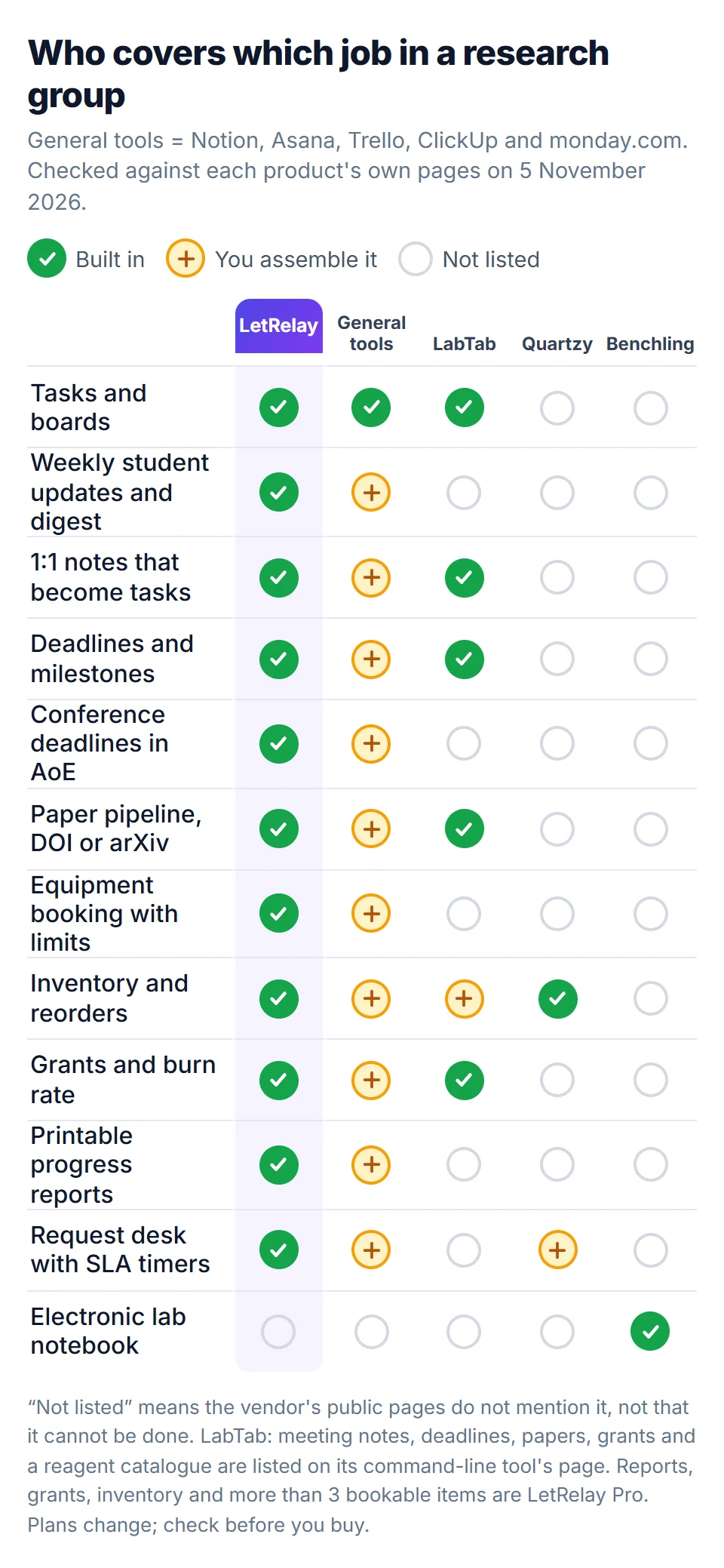
Tap or click any graphic in this post to open it full size. Read the green ticks as "built in", the amber plus as "possible, but you assemble it", and the empty circle as "not listed on the vendor's public pages". An empty circle is not a claim that the product cannot do it. It means we could not find it, and you should ask the vendor.
What a research group needs from software
A lab is not a company, and the difference shows up in the week. A PI with eight students has a handful of jobs that repeat, and none of them is "manage a project":
- Know where each student is without sending eight messages on Monday.
- Run the 1:1s so that what was agreed last time is still visible this time.
- Hold the dates: qualifying exam, proposal, annual review, conference deadlines, a funding end date, a visa expiry.
- Run the shared things: the microscope, the GPU node, the freezer, the reorder list.
- Show the output to a department or a funder: a progress report, a publication list, how much of a grant is left.
A general task tool handles a card, an owner and a due date. It does not know that a PhD has a qualifying exam in year two, that an "AoE" deadline holds until the day has ended everywhere on Earth, or that a wellbeing score is for supervisors only. You can teach it with templates, custom fields and automations. That is real work, and somebody in the lab then maintains it.
LetRelay starts from those five jobs. The rest of this post is about whether that is a good trade for you.
How LetRelay runs a week
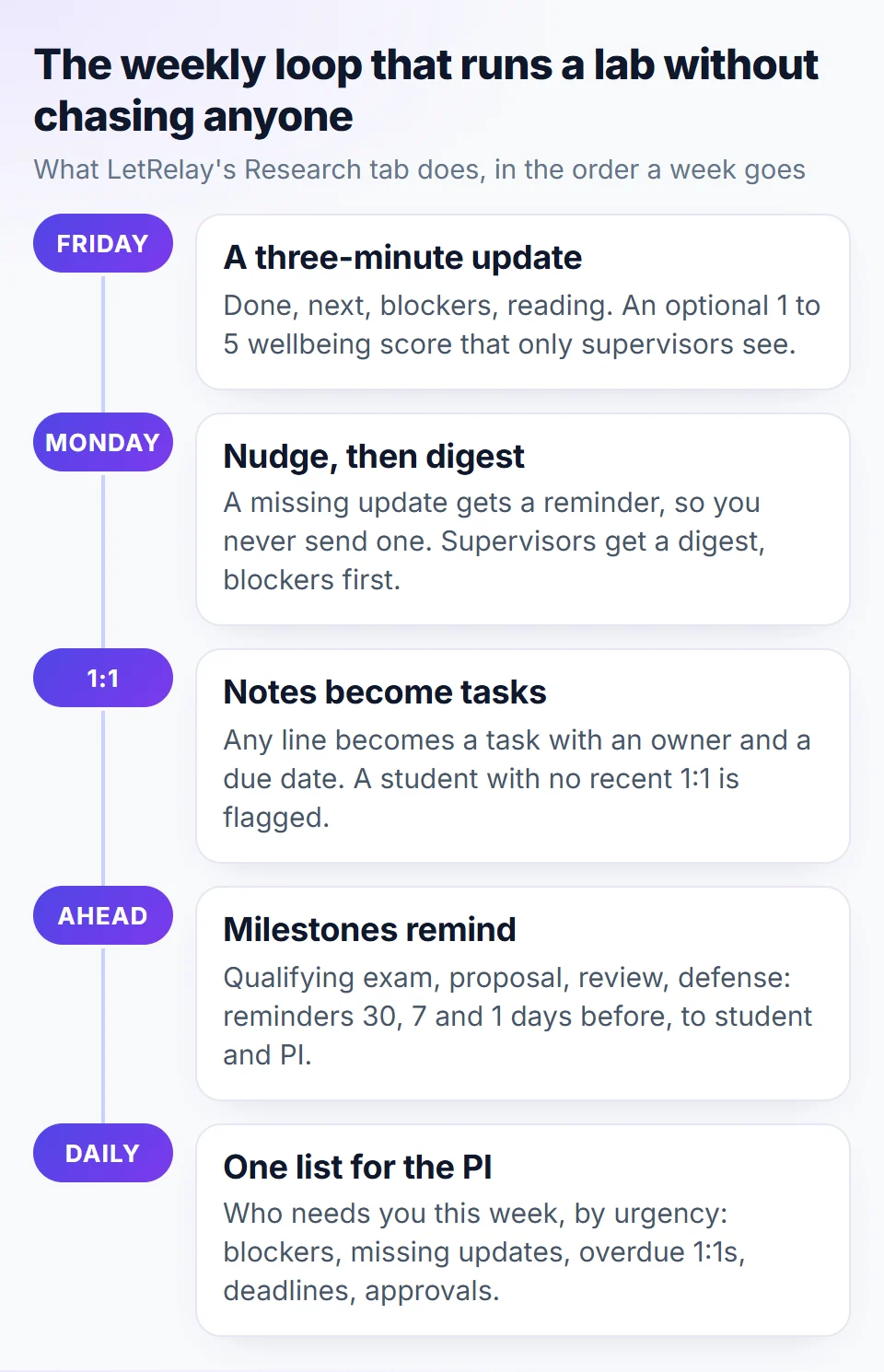
The Research tab is built around one loop.
- Friday: the update. Each student writes a three-minute update: what they did, what is next, what is blocking them, and what they are reading. They can add a 1 to 5 wellbeing score, which only their supervisors can see.
- Monday: the digest. A student who skipped the update gets a nudge, so you never send one. Supervisors get a digest with blockers at the top. There is an optional AI summary of the whole group, and when the free AI allowance runs out it falls back to a plain list.
- The 1:1. Notes are kept per student, and any line can become a task with an owner and a due date. A student with no recent 1:1 is flagged as overdue.
- Milestones. Qualifying exam, proposal, annual review, thesis and defense carry a due date, a supervisor sign-off, and reminders 30, 7 and 1 days ahead, to the student and to you. Papers move from idea to camera-ready, and conference deadlines count down in AoE.
- One list for the PI. The home page is a single list of who needs you this week, ordered by urgency: blockers, missing updates, overdue 1:1s, milestones, paper deadlines, funding or visa dates, and approvals waiting.
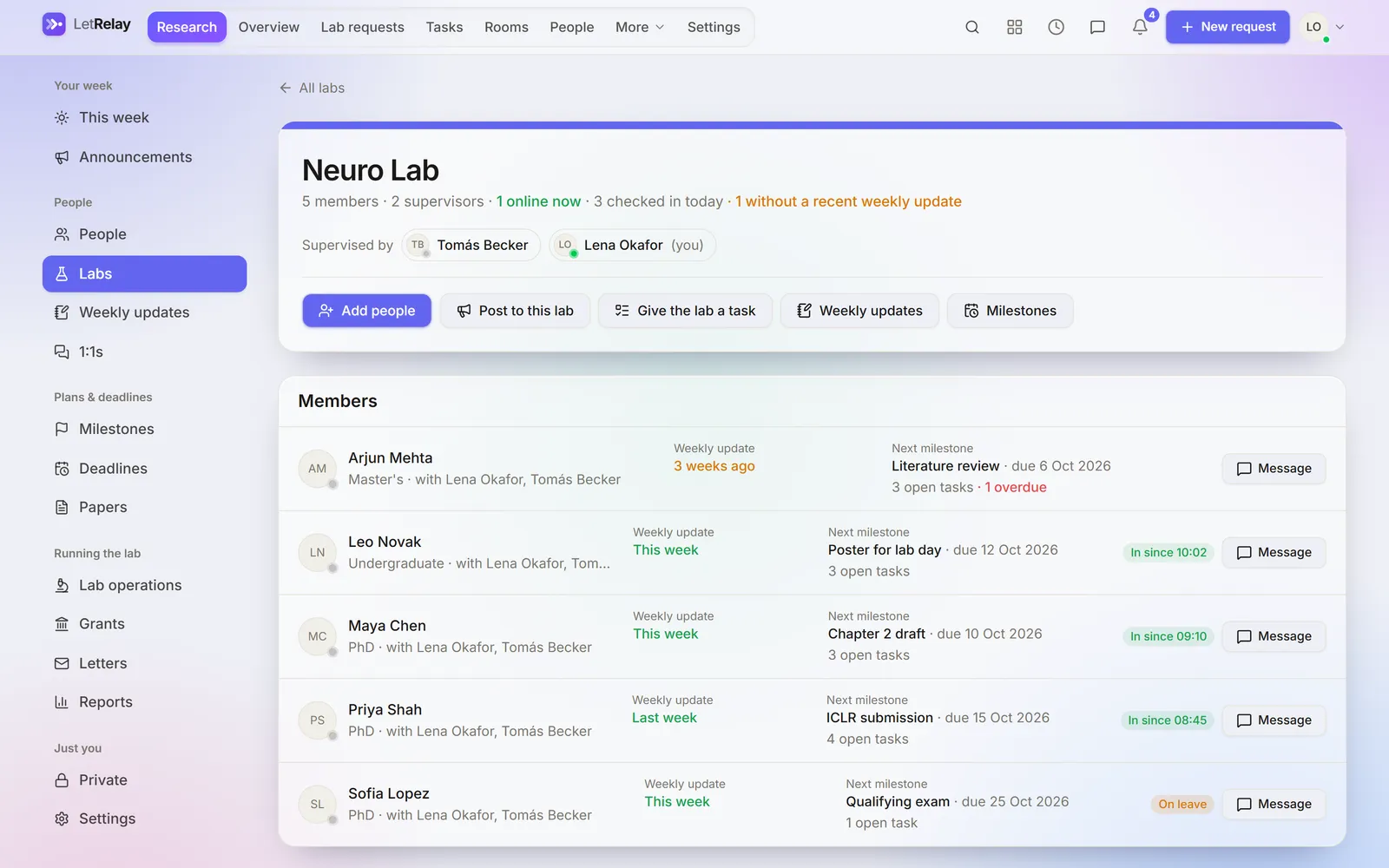
That screen is a demo lab, not a mockup. The one student with an update "3 weeks ago" and an overdue task is the person you would otherwise find out about at the next committee meeting. If you want the method without the software, it is written up in how to manage PhD students without chasing them, and the update itself is in the PhD weekly update template.
The tutorial, if you would rather watch
There is a 31-minute walkthrough on YouTube that goes through a professor's setup from an empty workspace: adding students, the weekly update, 1:1s, milestones, papers and AoE deadlines.

Reports: what you actually get
Reports are where lab software usually falls down, because the data is scattered. In LetRelay the report is a by-product of the weekly loop.
A progress report for each person, over any date range, shows:
- milestones met, 1:1 meetings held, and weekly updates written out of the weeks in the period, with the longest run;
- the milestones met, what is coming up, and the papers;
- a summary and the supervisor's comments, with an optional "draft from the facts" button that writes a first version from the record, which the supervisor edits and saves;
- a space for the student's own comments.
A report for the whole group shows publications as citations, papers in progress, milestones met, 1:1 meetings, who joined, how many updates were written, and each grant with how much is spent and when it ends.
Both print or save as PDF, for a department or a funder. Reports, grants and inventory are Pro features. On the Free plan the weekly loop, 1:1s, milestones, papers, deadlines and recommendation letters all work, but the printable reports do not. We would rather say that here than have you find it after signing up.
Compare that with the general tools. Trello's dashboard view is a Premium feature ($10 per user, billed annually), ClickUp's dashboards are on Business ($17), and Asana lists reporting dashboards from its Starter plan. All of them can chart your cards. None of them knows what a progress report for a doctoral student contains, so you would build that template and keep it current.
The general tools: Notion, Asana, Trello, ClickUp, monday.com
These five are good products, and for some labs they are the right answer. If your group already lives in one, and your needs are a task list and a calendar, switching is not worth it.
What each one's own pricing page says:
- Notion has a free plan with 5 MB file uploads and 7 days of page history. Plus is $10 per member and Business is $20. Its education offer is the Plus plan free for students and educators, limited to one member, so it helps an individual, not a lab.
- Asana's free Personal plan is limited to 2 users. Starter is $10.99 per user billed annually ($13.49 monthly) and adds reporting dashboards, timeline and Gantt views.
- Trello's free plan allows up to 10 collaborators and 10 boards per Workspace, with 250 automation runs a month. Standard is $5 per user billed annually.
- ClickUp's Free Forever plan has 60 MB of storage, 5 Spaces and 100 automation actions a month. Core is $9 per user and Business, which includes dashboards, is $17.
- monday.com's free plan is 2 seats, and paid plans start from 3 users. Basic is $9 per seat billed annually.
Two things are worth weighing. First, price: for ten people the cheapest paid plan of each costs between $50 and about $110 a month, against $20 flat for LetRelay Pro. Second, and larger, the assembly cost. A weekly update that arrives on Friday, is nudged on Monday, rolls into a supervisor digest and keeps a private wellbeing field is a form, an automation, a view and a permission setup. People do build this. It then depends on whoever built it.
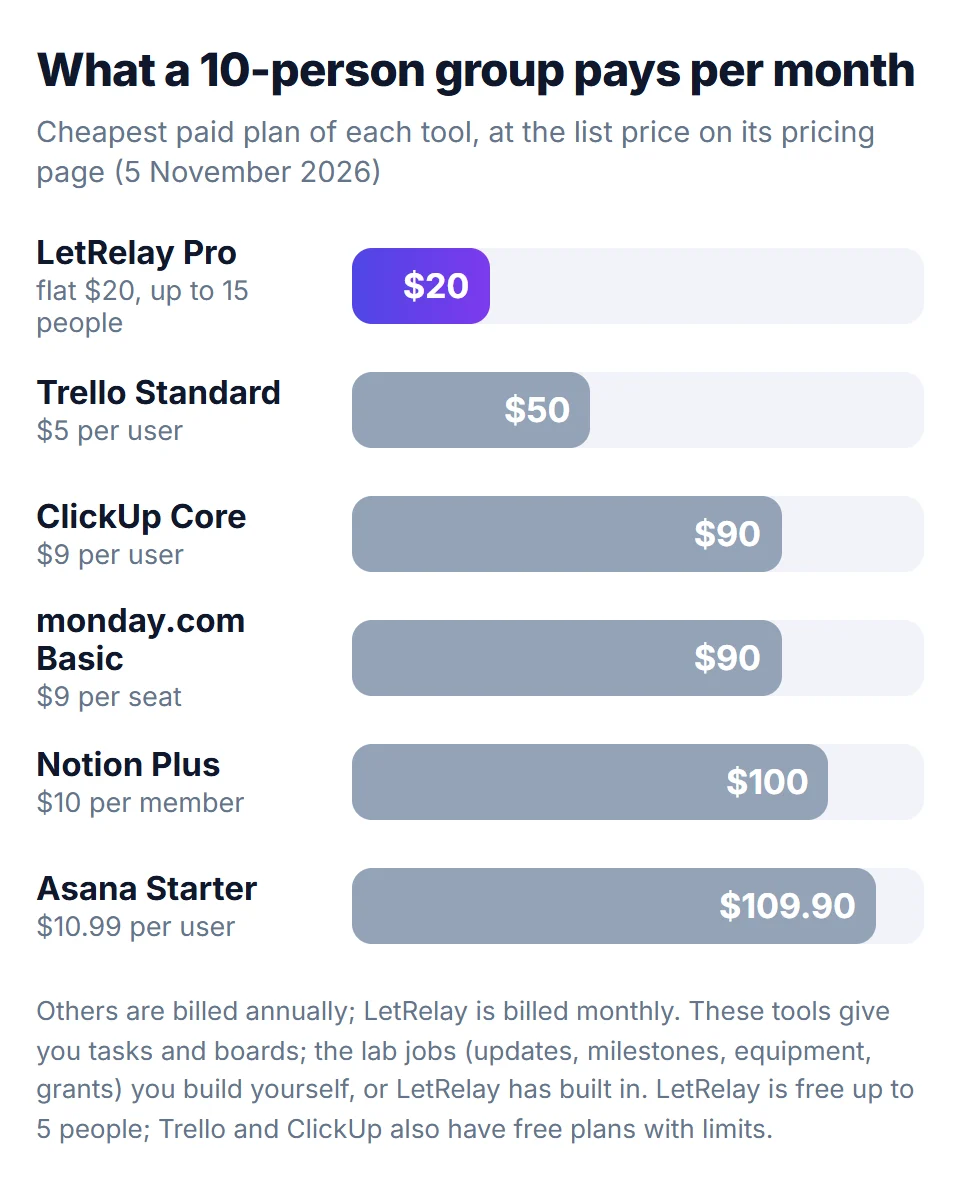
Where the general tools win: they are bigger, they have large template libraries, and many people already know them. Where LetRelay wins: the lab structure exists on day one.
LabTab
LabTab is the closest product to LetRelay in purpose. Its public command-line tool describes it as the lab management platform for principal investigators, made by Wetware Ltd. That tool covers grants, papers, meetings, tasks, projects, lab members, deadlines and a reagent catalogue.
We could not read a price on its website, so we have left cost out of this comparison, and we are describing it only from that public documentation. If you are choosing between the two, try both with a real group of students for a few weeks. Things to test, in whichever you pick: how a student's weekly update reaches you, whether reminders fire without anyone setting them up, whether a student can see another student's notes, and what a year-end report looks like.
LabTab's public documentation does not list weekly updates with a supervisor digest, equipment booking with per-person limits, a request desk with SLA timers, or printable progress reports, and LetRelay has all four. It does list a reagent catalogue, which LetRelay does not have in that form. That is a statement about what is documented, not proof of what LabTab can or cannot do, so ask them.
Quartzy
Quartzy does inventory and ordering and does it deeply. Its Academia plan is $50 a month for up to 3 users, billed annually, and includes inventory and location tracking, low-stock alerts, request workflows with approval routing, and access to its supplier shop of more than 10,000 products. It also lists integrations with Slack, Microsoft Teams, Google and Asana.
It does not supervise students and does not try to. If your pain is duplicate antibody orders, Quartzy is the better tool. LetRelay's inventory is simpler: a list with low-stock levels and a Reorder button that files a purchase request on the lab's own request desk. It has no supplier catalogue and no negotiated pricing, and many labs will want both. See lab inventory management for what an inventory needs.
Benchling, eLabFTW and LabArchives
These are notebooks, and LetRelay is not one. Benchling's free academic plan includes its Notebook and its Molecular Biology tools, and it says plainly that Inventory and Registry are built for industry and not offered to academic labs. eLabFTW is open source and self-hosted. LabArchives is often licensed by the university.
Keep your notebook. LetRelay runs the people side next to it: it links to Overleaf, Drive and GitHub and does not try to hold your data. Ask your research office which notebook your institution already pays for, then see our guides on lab management software and notebook policy.
For working teams too
LetRelay began as an internal request desk for teams, and a company, school or nonprofit can use it the same way. The pieces are tasks, project rooms with chat, a shared calendar, video meetings you can book without back-and-forth, and a request desk where each request has an SLA timer. AI suggests a category and priority for a new request. If the AI is unavailable, the request still saves and goes to a person. Attendance and leave, analytics, webhooks and an API-spend tracker are Pro.
A help desk product usually charges per agent. Zendesk's Support Team plan, for example, lists $19 per agent per month billed yearly and no free plan, only a 14-day trial. LetRelay's request desk is on the Free plan, which holds up to 5 people. For the background, see what an internal request desk is and how to track SLAs.
Privacy between students
This is the part comparisons skip, and it matters in a lab. A student sees their own work, their lab-mates, their supervisors and the PI, but never a peer's updates or 1:1 notes. Wellbeing scores and evaluations are visible only to the student and their supervisors. Grants stay with staff, and the Private tab belongs to its author alone. All of it is enforced by row-level security in the database, not hidden in the menu, so you can test it: make a student account and look. General tools can do something similar with careful sharing settings. The difference is where the rule lives.
Free tools that need no account
Separate from the product, there is a set of free tools on letrelay.com/tools. You do not sign up, and the ones that handle files run in your browser and upload nothing. They exist because researchers search for them, and most are used once and closed.
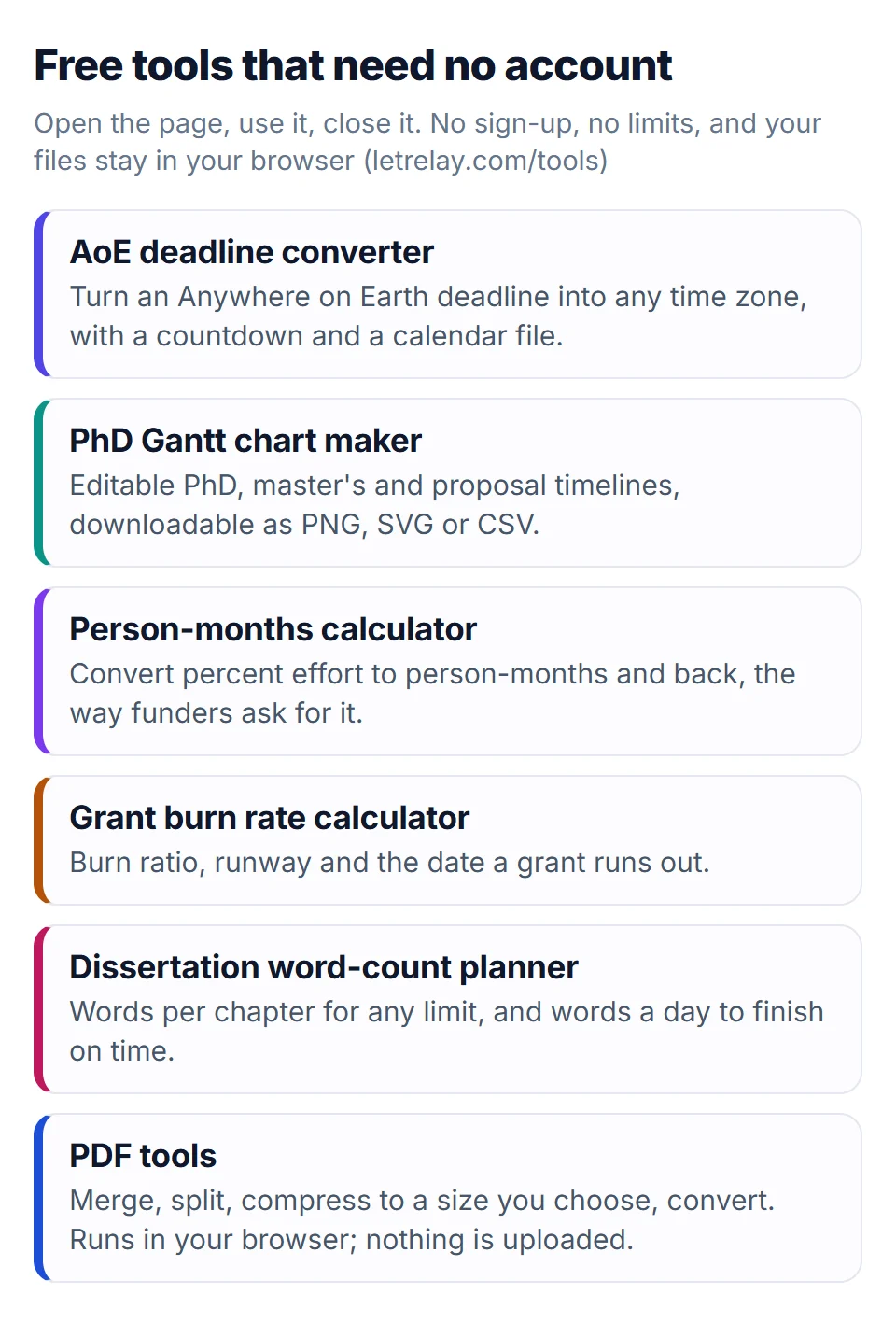
- The AoE deadline converter turns an Anywhere on Earth deadline into your time zone, with a countdown and a calendar file, and there is a page for each of IST, EST, PST, UTC, GMT, CET, KST, JST and SGT.
- The PhD Gantt chart maker produces an editable timeline you can download as PNG, SVG or CSV.
- The person-months calculator converts percent effort to person-months and back, and the grant burn rate calculator gives runway and the date a grant runs out. The method is in grant budget burn rate.
- The dissertation word-count planner splits a word limit into chapters and works out words a day.
- The PDF tools merge, split, compress to a size you choose, and convert.
Where LetRelay is the wrong choice
Saying this plainly is the point of a comparison.
- You need a lab notebook. LetRelay is not an ELN. Use Benchling, eLabFTW or whatever your institution licenses.
- You need university single sign-on (SAML). It is not there yet.
- You need to store drafts and data in the tool. LetRelay holds links to Overleaf, Drive and GitHub, not the files.
- You want a supplier catalogue. That is Quartzy's strength.
- You are one person with one project. A to-do app is enough.
- The AI allowance matters to you. On Free the AI allowance is shared and small, so summaries fall back to a plain list when it runs out.
- You need everything free. Free is up to 5 people. Printable reports, grants and inventory are Pro, at $20 a month for up to 15 people and $2 for each additional person. Every new workspace gets Pro free for 15 days, so you can see them before paying.
LetRelay is also a young product. The large tools have years of polish and communities that ours does not. What we can offer is that the lab structure is built in and the claims on this page are ones you can check yourself.
How to check this yourself in an afternoon
- Make a free workspace. No card is needed.
- Add three student accounts and one supervisor. Sign in as a student and try to open another student's update. You should not be able to.
- Run one real Friday update and Monday digest.
- Add a milestone and a conference deadline and see the reminders and the AoE countdown.
- Use the 15-day Pro trial to print a progress report from that data.
- Do the same in the tool you are weighing, with the same people. The one your students keep using is the answer.
Writing and connecting for researchers
The blog is not only product notes. We publish guides on the unglamorous parts of running a lab, such as the lab meeting agenda, the lab expectations document and the new PI first-year checklist, and researchers can write for it themselves. Guest posts come from real people about their own work: a study, a system, a team you ran, a lesson learned. They are read by an editor, usually within a few days, carry the author's name, affiliation and links, and are unpaid. Outside links in guest posts are marked nofollow, so it is not a place to buy rank. The rules are on the writer guidelines page.
It is not a social network and does not connect researchers the way a conference does. It is a place where a postdoc's account of how their group handles authorship order, or a lab manager's reorder system, can be found by the next person who searches for it.
FAQ
Is LetRelay an alternative to Notion for a research lab?
For the people side of a lab, yes. Notion gives you blank pages and databases, and you build the weekly update, milestones and reminders yourself. LetRelay has them built in, with privacy between students enforced in the database. If you want a general wiki and a flexible workspace for many purposes, Notion is the more flexible tool.
Is LetRelay better than Asana or Trello for managing PhD students?
Asana and Trello are strong task tools, but a task is not a student. They do not come with a Friday update, a Monday digest, degree milestones or AoE deadlines, so you assemble those. LetRelay starts from them. If all you need is a board of cards, Trello at $5 per user or its free plan is cheaper to adopt.
Does LetRelay replace LabTab?
They overlap, since both are aimed at the person running the group. We could only verify LabTab's features from its public documentation and could not read its price, so test both with a real group. LetRelay lists weekly updates with a digest, equipment booking, a request desk and printable reports, which LabTab's public documentation does not mention. LabTab lists a reagent catalogue.
Do I still need a lab notebook?
Yes. LetRelay is not an electronic lab notebook. Keep Benchling, eLabFTW or your university's tool for experiments and data, and use LetRelay for updates, supervision, deadlines and lab operations. Link between them.
How much does it cost for a 10-person lab?
$20 a month on Pro, which covers up to 15 people. Up to 5 people it is free with no card. Above 15, each extra person is $2 a month. For comparison, ten users on Trello Standard is $50 and on Asana Starter $109.90 a month, billed annually, with the lab structure still to build.
What is in a LetRelay progress report?
Per person: milestones met, 1:1 meetings, weekly updates written, what is coming up, papers, a summary, the supervisor's comments and the student's comments. For the group: publications as citations, papers in progress, milestones met, people who joined, updates written and each grant's spend and end date. Both print or save as PDF. Reports are on Pro.
Can students see each other's updates?
No. An update is read by its author, their supervisors and the PI. Wellbeing scores go only to the student's supervisors. The database enforces it with row-level security, so it does not depend on a sharing setting someone might get wrong.
Can I try the paid features before paying?
Every new workspace gets Pro free for 15 days, and Free needs no card. The free tools on letrelay.com/tools need no account at all.
Can a company or department use it, not only a lab?
Yes. It started as a request desk for teams. At sign-up you choose a company or a research group, and any workspace can switch the Research tab on later in Settings.
Sources
- LetRelay for research groups
- LetRelay pricing
- Notion pricing, including the education plan
- Asana pricing
- Trello pricing
- ClickUp pricing
- monday.com pricing
- Quartzy pricing
- Benchling for academics
- LabTab command-line tool on PyPI, describing the platform
- LabTab
- Zendesk pricing
- LetRelay for professors: the complete tutorial (YouTube)
Building LetRelay, the workspace for research groups and small teams: lab management, supervision tools, and an internal request desk with AI triage and SLA tracking.
Run your research group on LetRelay
Tasks, deadlines, weekly updates and supervision in one place, so you stop chasing students for news. Free for up to 5 people.
Keep reading
Lab Management Software for Research Groups: A 2026 Guide
Lab management software is really four kinds of tool: notebooks, sample systems, inventory and ordering, and group management. Here is what each does, the names PIs actually use, and how to pick a stack for a small academic lab.
Data Management Plan Requirements: NSF, NIH, UKRI, Tri-Agency
What the major funders require in a data management plan: NSF's two pages, NIH's 2026 format, UKRI's new policy from April 2027, and Canada's Tri-Agency policy. A side-by-side table, the overlap, and how to write one plan you can adapt.
Grant Budget Tracking: Burn Rate Formula and Template
Burn rate formulas for PIs, a grant tracking spreadsheet with commitments and a run-out date, what high and low burn rates mean, and a monthly review.